A terminal can be a surprisingly good place to work with a coding agent. The
conversation, commands, and changes stay together. But a few small things keep sending
you elsewhere: an image turns into [Image #1], a diagram arrives as a
block of source, and a setting you want to check lives behind another command.
Those are interface problems. A better answer from the model doesn't make the attachment visible again or put a useful control beside the prompt.
Anthropic introduced Claude Code mods on October 1. They let code change the application around the conversation. Three small examples make that idea tangible: a context bar, a hover preview for attached images, and Mermaid diagrams rendered directly in the transcript.
The three examples are in my Agent Harness repository, alongside reusable agent skills.
What a mod changes
A mod is JavaScript or TypeScript loaded inside Claude Code. It registers functions for events such as a turn finishing or a piece of the interface being drawn. Each function can let the event continue, change what gets passed along, or supply the result itself.
The packaging is familiar: mods ship inside plugins. A plugin is the installable bundle; the mod is the code in that bundle that participates in Claude Code's behaviour. That distinction matters because a plugin can also contain skills or an MCP server.
This also makes mods different from a shell hook, which runs a separate command when a configured event occurs. A mod stays loaded in the session and can connect an event to an interface that the person using Claude Code can interact with.
Context beside the prompt
The context-bar example puts the current model, effort setting, working folder, Git branch, permission mode, and context usage in one band above the input. The model and effort labels open menus. That turns a readout into a place to act.
Its implementation separates collecting information from displaying it. At session start and after a completed turn, it reads the host's usage figures, checks the working directory and branch, and updates the stored values. A separate once-per-second check keeps the model, effort, and permission labels in step with the host.
The distinction is useful: the usage number is a reading from Claude Code, not a fresh measurement made by the bar. The mod doesn't make the context window larger. It makes the reported usage easier to notice before sending another request.
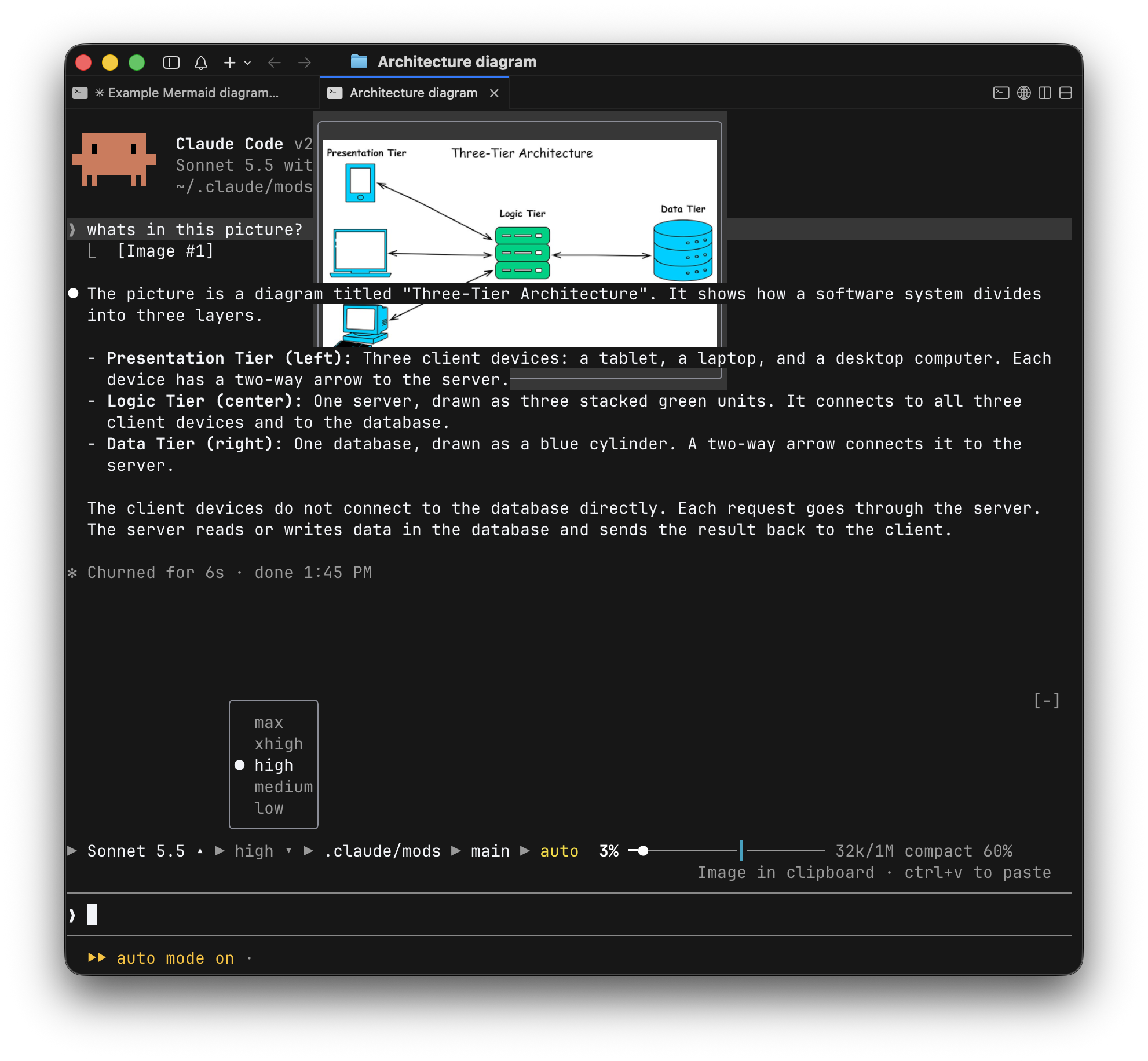
Selecting an effort level runs Claude Code's existing /effort command.
Selecting a model runs /model with a family alias, then checks the
session's model again. The menu gives those commands another entrance; the host still
decides which choices it supports.
That's a useful boundary to keep visible. A button can offer a choice that a particular host or account won't accept. The mod needs to handle that result rather than assume that changing its label changed the session.
Keep other mods in view
A band above the prompt sounds simple until two plugins both want to draw there. The
context bar and the Mermaid actions use the same render site, named
AbovePrompt. How do they coexist?
A hook receives three arguments: $ is the mods API, e is the
event, and next continues through the remaining handlers. Calling
next(e) gives the other hooks and Claude Code a chance to produce their
result. A UI hook can then include that result in its own layout.
Keep the drawing that comes back.
export function register(on) {
  on('ui.render', { component: 'AbovePrompt' },
    async ($, e, next) => {
      const { Box, Text } = $.ui.resolve(e);
      const below = await next(e);

      return Box({
        flexDirection: 'column',
        children: [
          Text({ children: 'A custom status line' }),
          below
        ]
      });
    });
}A custom status line This hook adds it
Copy code · Save PNG · Hide Returned by another hook
below would discard that drawing. This simplifies the composition used
by context-bar and mermaid-inline.
The
launch walkthrough
describes this as a chain of hooks. That makes next more than
boilerplate: whether a hook calls it, what it passes, and what it returns determine
how customizations stack.
Here the result is visual, but the same question matters for behaviour. A tool hook that answers an event itself stops the usual path. A hook that observes and continues leaves the rest of the path available. Composition is part of the feature's design.
An image reference you can see
After an image has been sent, its numbered reference is a useful identifier and a poor
reminder of its contents. The image-preview example makes that reference hoverable.
Move over [Image #1] and a thumbnail appears beside the message.
The code links image numbers to source-file metadata in the session messages. It uses
macOS sips to make a PNG thumbnail, caches the result, and draws it in
the user-message row. When it can't resolve the image or create a thumbnail, it leaves
the normal message rendering in place.
That dependency on metadata is easy to miss. The visible number isn't the image, and the mod needs a route from the number to an available file. This implementation is also macOS-specific and targets an image-capable terminal. It isn't evidence that the same preview works in every Claude Code surface.
The change is small, but its purpose is precise: bring the thing being discussed back into view without reopening it elsewhere. It doesn't change what image the model received.
From Mermaid source to a picture
Mermaid describes diagrams as text. That's convenient for a model to generate and for a developer to edit, but the structure is often easier to understand once it's drawn. The mermaid-inline example closes that gap inside the conversation.
It looks for complete mermaid code fences in assistant messages. For each
diagram, it writes the source to a temporary file and runs the Mermaid CLI,
mmdc, to produce a PNG. The rendered image replaces that block in the
displayed message; surrounding prose remains Markdown.
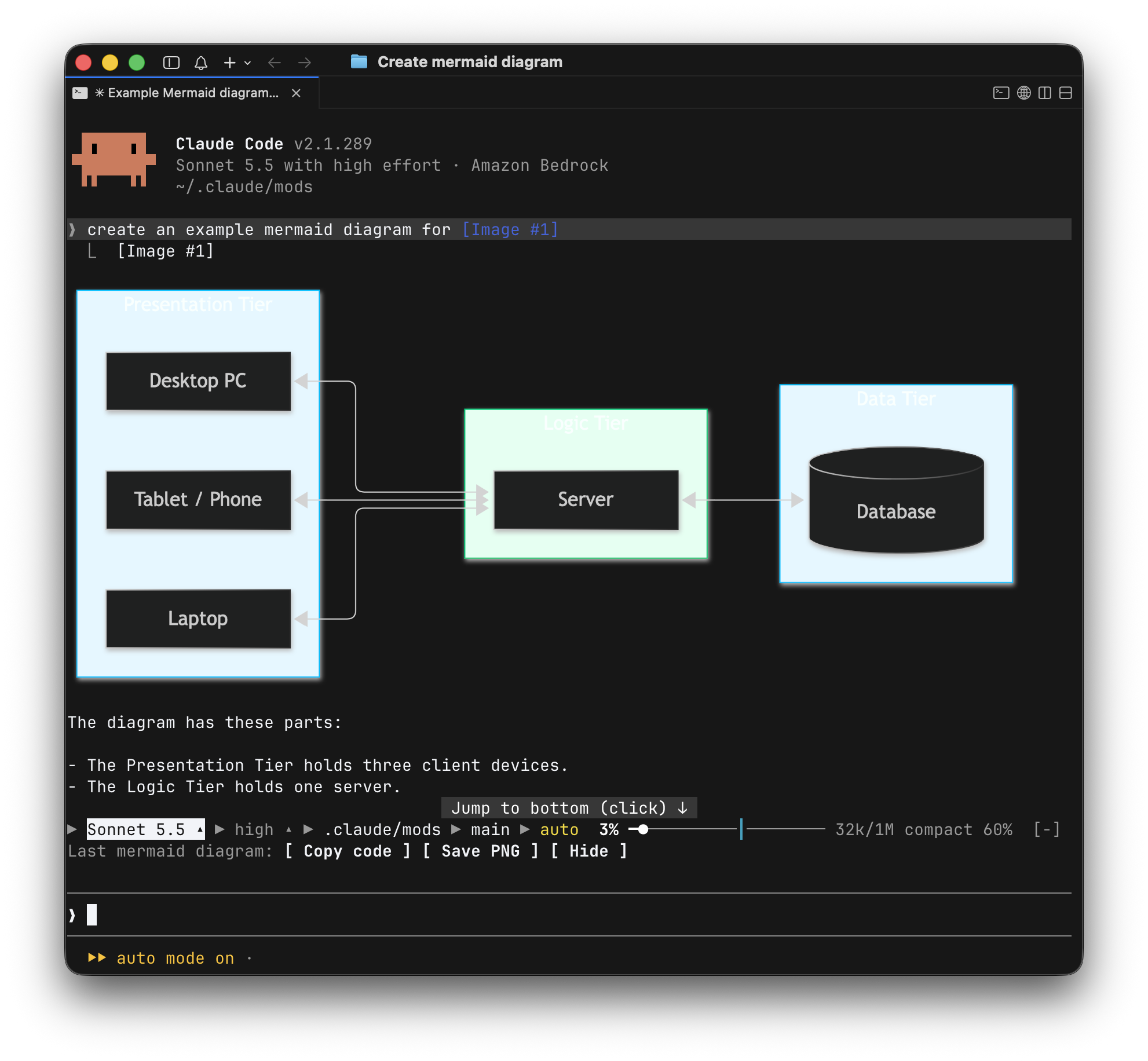
Two details keep this from becoming a fragile decoration. The parser waits for a closing fence, so a half-written streaming block remains text. If the renderer fails, the original code block is displayed instead. A cache avoids repeatedly rendering identical source within the loaded module.
The buttons operate on the newest diagram. Copy code preserves the editable source. Save PNG renders a separate file on a white background. Hide clears the action row; it doesn't remove every diagram from the transcript.
A mod supplies the integration, not every dependency. This one still needs
mmdc and terminal image support. Its save-and-open action also uses the
macOS open command. And a neatly rendered diagram can still describe the
wrong architecture: displaying the output doesn't verify it.
Start with one visible change
For a first mod, pick a change that's easy to see and easy to judge. A branch label above the prompt is a better starting requirement than an entire replacement interface. Anthropic's mod creation guide also supports describing the feature to Claude Code and letting it write the plugin.
Make a Claude Code mod that shows the current Git branch
above the prompt. Update it after each completed turn.
Preserve anything other mods draw in the same band.
If this folder isn't a Git repository, show nothing.
That request defines an event, a location, and a failure case. It also says what should happen when the feature shares space with another customization.
The minimal package has a manifest at .claude-plugin/plugin.json, a
hooks/hooks.json file naming the module, and the module exporting
register. For a local plugin directory, the basic review loop is:
claude --version
claude plugin validate ./branch-label
claude --plugin-dir ./branch-label
Mods require v2.1.287 or later. Inspect the generated types for the installed host when working against the API, and test the visible result in the interface where it will be used. Validation can help inspect a package; it doesn't establish that a menu works, a thumbnail appears, or two mods share a render site correctly.
There is also a real trust boundary. Anthropic's announcement says mods aren't sandboxed and run with Claude Code's access to the machine. A pleasant-looking UI doesn't limit the code behind it. Read the module and its process, file, and network calls before treating a plugin as a cosmetic add-on.
A smaller gap between work and interface
The useful idea in mods is that a recurring interruption can become a small piece of software. A setting can live beside the prompt. An attachment can stay visible from its reference. A diagram can appear where its source was generated.
Each example has a narrow job, a host API behind it, and a fallback when the ideal path isn't available. That gives a practical way to choose the next customization: find something the interface keeps making you leave the conversation to do, then build the smallest change that brings it back.