I've been really enjoying cmux. The part that keeps standing out is how easy it makes moving between several coding agents and their conversations. Workspaces, tabs, and split panes give the work a place, so walking from one session to another doesn't feel like starting the search again.
That sounds like a small terminal convenience. Once several agents are working at the same time, it becomes a useful question: how do you leave one conversation, check another, and still know what you were doing when you return?
A place to come back to
A coding conversation rarely stands alone. There is the request, the code being changed, the output from a check, and often another conversation investigating a different part of the problem. A terminal can keep each session running while the person supervising it still loses their place.
Consider a small example: a function that totals an array needs to handle an empty input. One conversation can investigate the behavior while another reviews the proposed change. The useful information is spread across the request, the implementation, and the checks. Switching between them means remembering which session belongs to which question.
A stable layout gives that memory something to attach to. The brief is on the left, verification is on the right, and the next task lives in another workspace. Returning to the same arrangement provides a cue before any transcript needs rereading. The benefit is partly about what remains visible, and partly about knowing where to look.
The layout has layers
cmux's topology documentation gives the layout a useful vocabulary. A window is the macOS window. A workspace is an entry in its sidebar. Inside a workspace, a pane is one region of a split layout, and a surface is a tab within a pane.
This distinction matters because switching a workspace replaces the whole arrangement on screen. Switching a surface replaces the content inside one pane. Splitting a pane makes room for something that needs to stay visible beside the current session.
The screenshot shows a workspace named Article demo: Review. Its left pane has Brief and Code tabs, with Code selected. Checks occupies the right pane, so two agent conversations are visible together.
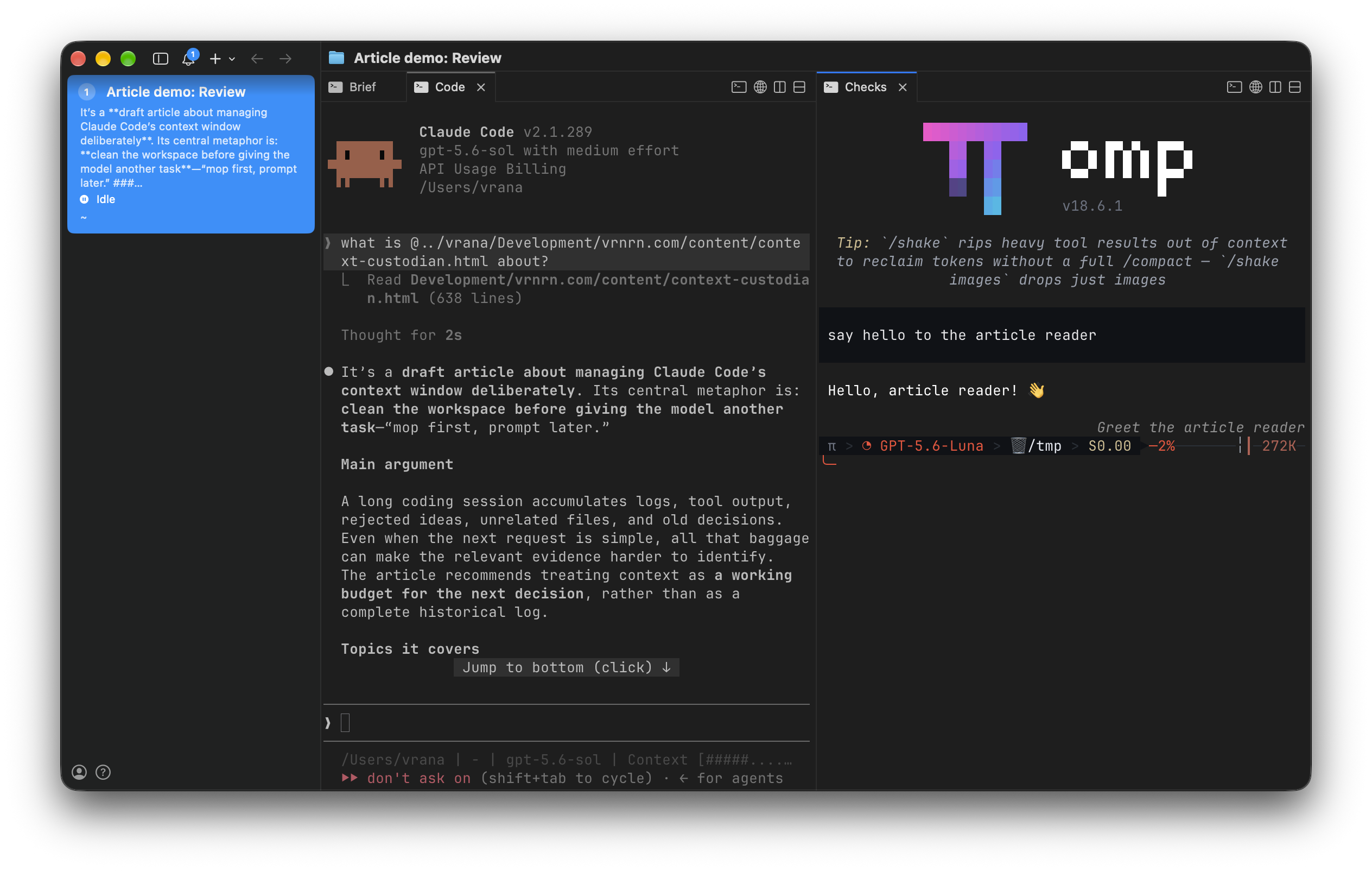
- Workspace
- Article demo: Review
- Left pane
- Brief · Code selected
- Right pane
- Checks
The Code tab belongs to the same pane as Brief. Selecting it changes that side of the screen while Checks remains beside it. Tabs are useful for related material that can take turns being visible. A split earns its space when seeing both sides at once helps answer a question.
The names have been set around each conversation's job. The workspace names the task; Brief, Code, and Checks name the roles within it. The sidebar also shows a conversation preview and an Idle indicator, giving another cue when finding a session. A useful label lets you choose where to go before rereading the conversation.
This gives tiling a practical purpose: keep the comparison visible and give each transcript enough room to read. Tabs give related material somewhere nearby to wait.
Leave the task and return
A second workspace gives another question its own arrangement. Selecting it replaces the article-review layout on screen. Selecting Article demo: Review again brings back its panes and selected tab.
That is the behavior behind the feeling of walking between workspaces. The workspace is a place to return to, not just a title in a long row of sessions. A separate investigation can have a different arrangement without making the current one disappear into a pile of windows.
For several coding agents, a useful starting point is a workspace per task, with the related conversations and checks inside it. Grouping by the question makes it easier to remember what each session is for.
Claude teams in the open
Another part I particularly like is being able to see Claude's team conversations together. cmux calls this integration Claude Code Teams, launched with:
cmux claude-teamsThe distinction between a team and a subagent is useful here. Claude's documentation describes ordinary subagents as work delegated within a session, with results returned to the caller. Agent Teams coordinate separate teammate sessions, whose conversations can appear alongside the lead's.
The cmux integration enables Agent Teams. It supplies a compatibility layer called a tmux shim: when Claude requests teammate panes through tmux commands, the shim translates supported operations into cmux operations. Teammates appear in native cmux splits through this shim.
The appeal is straightforward. Separate visible sessions make it easier to inspect a teammate's actual conversation, notice an assumption, and direct attention to the right place. The lead's summary is still useful, but the work behind it can be available alongside it.
A team is useful when independent parts of a task need discussion between participants. For a focused check, a subagent can investigate one question and return its result to the caller. The task gives the arrangement its purpose.
Ghostty underneath
The terminal also feels good to use. Its Ghostty foundation is part of what I enjoy about cmux's performance, especially when moving through these sessions.
cmux uses libghostty for terminal rendering. The project's explanation distinguishes the Ghostty terminal application from the rendering library used inside cmux. cmux adds its own macOS interface around that engine. Its primary repository describes a native Swift and AppKit app with GPU-accelerated terminal rendering.
Give the space a job
A good layout makes a question easier to inspect. Keep the request beside the proposed change when checking intent. Keep the verification result beside the change when deciding whether to accept it. Move an unrelated question to another workspace when it stops helping the current comparison.
Clear names make that movement deliberate. Give the workspace a task name and each tab a role, so the next conversation is easy to locate.
Keeping your place
What keeps me coming back to cmux is this combination: a terminal that feels responsive, enough spatial structure to keep several conversations close, and team integrations that can make parallel work visible.
The useful next step is small. Put one task in a workspace, keep the two things you need to compare in separate panes, and use tabs for the material that can wait. Then leave that workspace and return. If the arrangement helps you pick up the question again, it is doing its job.
The payoff is having a clear place from which to understand the agents' work.