A project can have one thread building a screen, another checking tests, and a third reviewing the result. Keeping them moving means reading updates, finding the right conversation, and translating each decision into another prompt. The work is parallel. The attention it asks for is still yours.
What happens when that coordination becomes a conversation? Something like: “Check the settings project. Tell me which threads need a decision, then ask the review thread to look at keyboard navigation.”
That's the part of voice control I find exciting. Speaking a prompt is useful. Being able to direct a whole project while looking at the work feels like a much bigger change.
Speech that reaches the work
Today's July 23 release notes introduce ChatGPT Voice, powered by GPT-Live, in Chat, Work, and Codex in the desktop app. A new voice conversation can start, check, and steer work in other threads. That makes the conversation a place to coordinate tasks, rather than just discuss them.
The voice guide distinguishes a live conversation from dictation, which turns speech into prompt text. That distinction matters. With dictation, the main saving is typing. With a live session, the useful unit becomes the exchange: give an instruction, hear what needs attention, clarify it, and carry on.
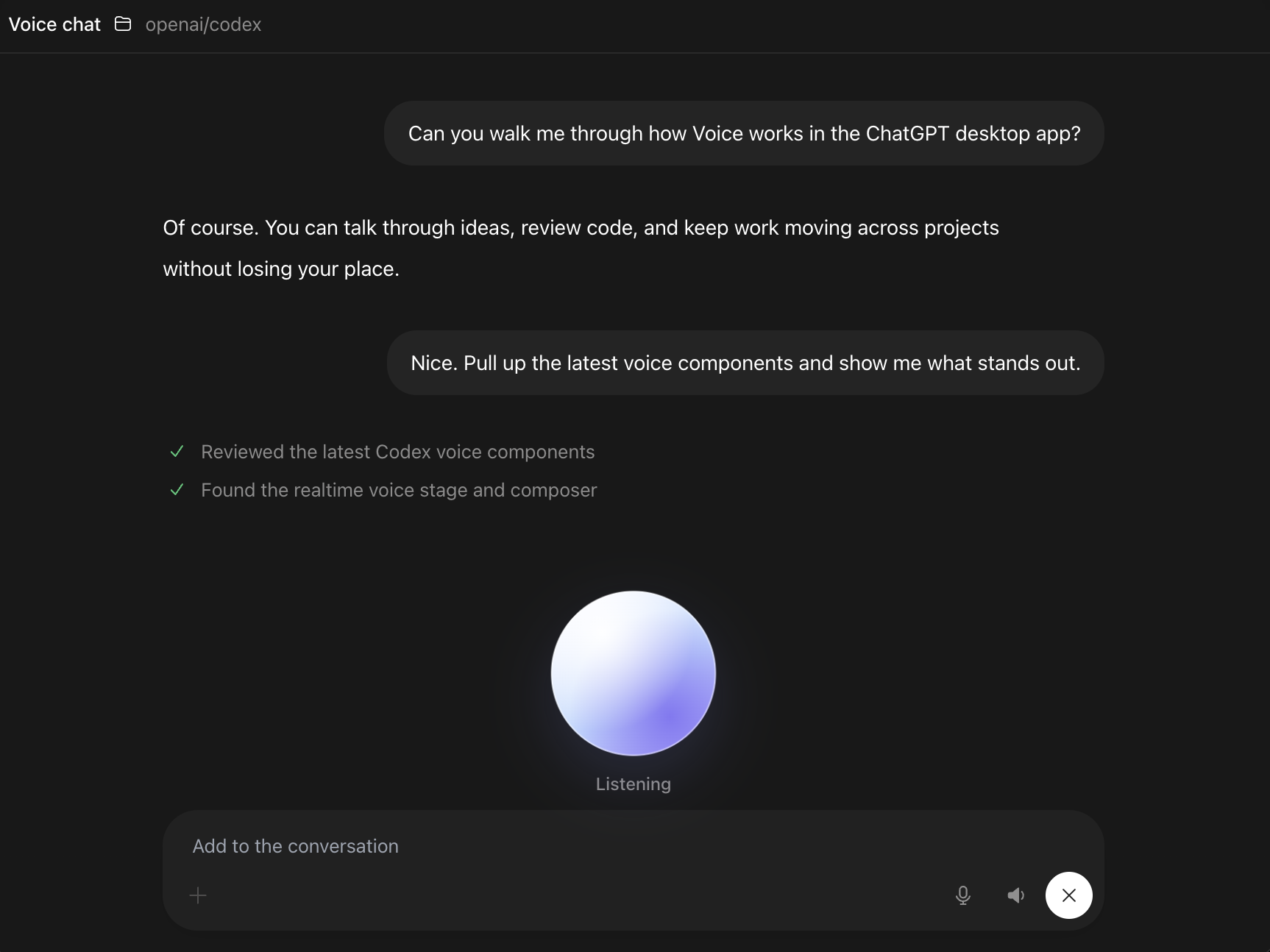
The screenshot makes that relationship tangible. The conversation stays visible while the session listens, and reported work appears alongside the messages. A spoken update has something on screen to return to when it needs a closer look.
A spoken request doesn't need to contain a perfectly arranged specification. It might begin with “The settings screen feels cramped,” develop into a discussion about the layout, then end with a scoped change for the implementation thread. The conversation helps turn a reaction into work someone, or some agent, can actually do.
This doesn't make every instruction easier to say. A file path, an exact error, or a large diff often belongs on screen. Voice is most interesting for the parts of development that already sound like a conversation: describing intent, deciding priorities, and explaining why a result doesn't feel right.
Computer use makes the loop tangible
Voice gives that conversation a natural input. Computer use gives the task a way to reach the interface.
Computer Use lets an agent inspect and operate graphical applications, including clicking and typing. The distinction from screen context is useful: seeing a window provides information; operating it allows a task to test a flow or change something in that application.
The July 23 update also supports sharing an appshot of the frontmost window on macOS. An appshot is a capture of an application's context. That gives a request such as “Look at this screen” something concrete to refer to.
Take the settings screen example. “The Save button doesn't work from the keyboard” describes a behaviour to investigate. A computer-use task could open the screen, move through its controls, try the button, and report what happened. A coding task could then examine the relevant code. After a change, the same interaction gives the review something to check.
The interesting loop is the connection between those steps. A spoken observation reaches a visible action, the action produces evidence, and that evidence shapes the next instruction. It reduces the amount of translation between what a person notices and what an agent investigates.
Computer use earns its place when the interface matters. Reading a file or running a test through a direct tool is often clearer than clicking through an app to achieve the same thing. Pairing voice with computer use should expand the ways a task can act, while leaving it free to choose a suitable tool.
One session across the project
A single conversation becomes especially useful when several threads are working on related pieces. Here, a thread means a separate task conversation with its own instructions and history. Keeping those histories separate can help each task stay focused. Coordinating their priorities is another job.
Imagine a small settings feature with three named threads: Settings screen, Settings tests, and Keyboard review. One voice session could ask what each needs, route a decision to the relevant thread, and bring the results into a project-level discussion.
Now suppose the requirement becomes more specific: saving must work without a mouse. The implementation needs to handle the interaction, the tests need to cover it, and the review needs to exercise it. Saying that once is appealing, provided the session makes the separate follow-up instructions visible.
“Make sure Save works without a mouse. Send that requirement to the screen, tests, and review threads.”
“Check focus and keyboard activation of Save.”
“Add a regression case for saving from the keyboard.”
“Tab to Save, activate it, and check that the change persists.”
Back to the voice sessionWhich task needs a decision? What evidence is ready to review?
The cool part is having a place to talk about the entire project while the work remains in separate threads. “What needs me?” is a different question from “What did the last agent say?” It asks the session to connect task status to a decision.
That connection needs explicit handoffs. If the tests depend on an implementation change, they must check the updated code. Three encouraging updates don't establish that the feature works together. The voice session should surface the dependency, then ask for evidence from the relevant state of the project.
Instructions still need a destination
The easier it becomes to give an instruction, the more important it becomes to know where it went.
“Fix that too” can be obvious to a person looking at the same screen and ambiguous to a session juggling three conversations. Which thread? Which issue? Is this a new request or a replacement for the previous one?
A useful coordination habit is to name the task and the intended result: “Ask Settings tests to cover keyboard activation of Save. Leave the existing click test in place.” The session's reply should identify the destination and the instruction it sent. That small acknowledgement makes a misrouted request easier to catch.
A session coordinating threads also shouldn't assume every thread knows everything discussed elsewhere. A decision needs enough context to travel: the requirement, the reason if it affects the solution, and the condition that counts as done. Voice changes how that context is supplied. It doesn't remove the need for it.
Keep the result visible
Speech is convenient for asking what's ready. A screen is better for examining a diff, comparing layouts, or reading a test failure carefully. A useful voice workflow should move naturally between the two.
For the settings example, “The keyboard test passes” is an update. The test output and the interaction it covers are the evidence. “The screen looks good” is an opinion. Showing the screen makes the opinion discussable. The spoken answer should help locate the result, then leave room to inspect it.
There are practical limits too. Speech recognition can get a name wrong, a screen capture can miss the relevant state, and a successful click can still fail to save the intended value. Requests need clear targets and observable checks. Access to an application also needs its own permissions; a spoken instruction isn't a reason to assume unlimited control.
These aren't reasons to make every exchange elaborate. They're reasons to keep the fast part fast and the consequential part reviewable. A short conversation can end with a precise task and a result worth looking at.
Control at the level of intent
Voice feels like a next frontier of control because it can bring the interface closer to the level at which a person is thinking. “Check every thread and tell me what's blocked” is about the project. Opening conversations one by one is the navigation currently needed to answer it.
Pair that with computer use, and the conversation can reach the places where the work becomes visible. It can help move from a concern about a screen to a task that examines the screen, then from that observation to a change and a check.
The useful ambition is a voice session that keeps the project understandable: work stays in focused threads, instructions reach the right destinations, and results come back with something to inspect. That's what makes the idea exciting. A conversation becomes a way to direct the work, while the project still gives the decisions a concrete form.